
CAD Forge Max is the XR Center agent that processes 3D Library data. With an extension, it runs your own C# program on the product structure of a 3D Library element: merge assemblies, recolor parts, generate physics meshes… without touching the original CAD.
How it works
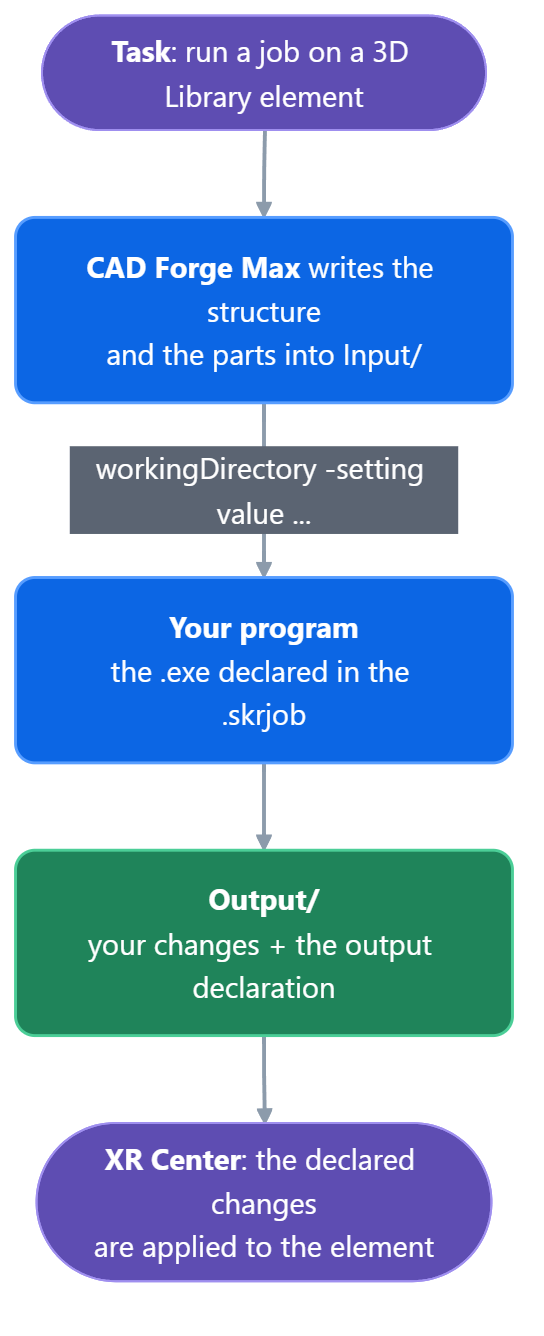
-
A task asks CAD Forge Max to run a job (for example Merge structure) on a 3D Library element.
-
The agent writes the element's product structure and parts into a working folder (
Input). -
It runs your program with this folder and the job settings.
-
Your program writes its changes into
Outputand declares them. -
The agent applies the declared changes to the element in XR Center.
An extension is a .skrjob file (the job description) and a .NET executable, delivered through the XR Center Marketplace or a local folder.
Pages
|
Page |
Content |
|---|---|
|
Anatomy of an extension, the |
|
|
Set up your machine and create your extension. |
|
|
Build, deploy, enable the job and set its settings. |
|
|
Complete extensions: change colors, merge structure, physics meshes. |