
Choose your option
XRCenter serves HTTPS on port 9228, and every client — Deck, apps launched by Deck, agents, browsers — validates its certificate. Pick the option from your situation:
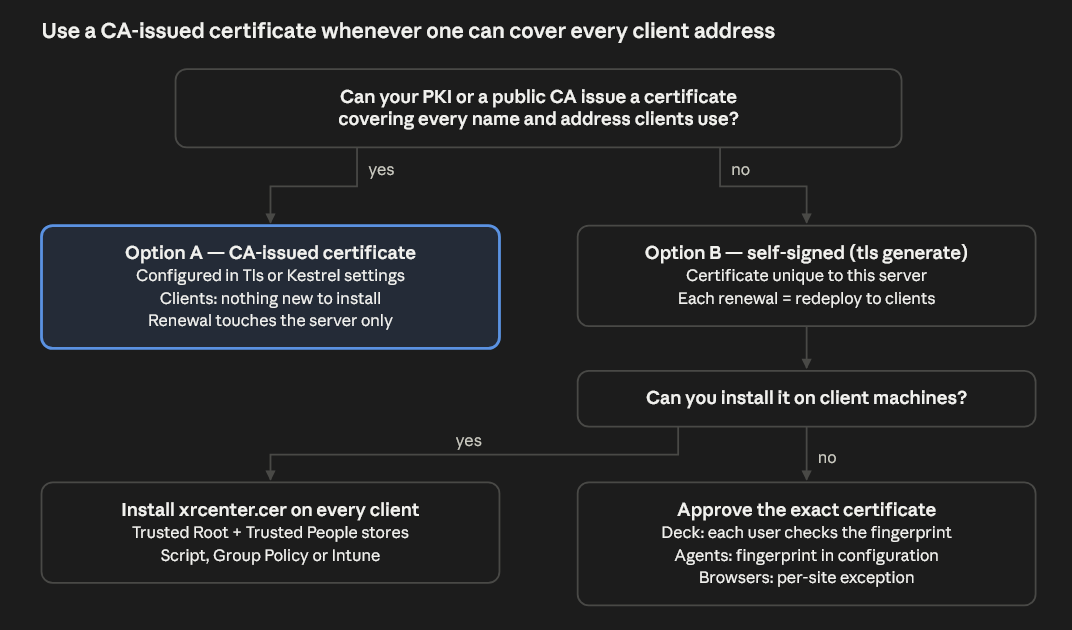
Option A is necessary on a server: a certificate from your PKI or a public CA.
Option B exists for installations with no PKI, and costs a redeployment to every client at each renewal. It is mostly used on local installations.
Option A — certificate from your PKI or a public CA
The recommended option. Clients that already trust your CA trust XRCenter with no installation on their side, and renewing the certificate touches no client.
Open C:\ProgramData\Skr\xrcenter\xrcenter.json
According to the type of certificate, the configuration is different. Add the corresponding snippet being careful with commas and curly braces.
-
CER
{ "Tls": { "Certificate": { "Thumbprint": "<thumbprint>", "StoreLocation": "LocalMachine", "StoreName": "My" } } } -
CER + KEY
"Kestrel": { "Certificates": { "Default": { "Path": "C:\\certs\\server.cer", "KeyPath": "C:\\certs\\server.key", "Password": "<only if the key is encrypted>" } } }, -
PFX
"Kestrel": {
    "Certificates": {
        "Default": {
            "Path": "C:\\certs\\server.pfx",
            "Password": "<only if the key is encrypted>"
        }
    }
}
Scripts
Get Thumbprint by subject name
Get-ChildItem Cert:\LocalMachine\My | ? Subject -like '*subject.company.com*' | ft Thumbprint, Subject, NotAfter
Test certificate validity by subject name
$name = 'subject.company.com'
$s = [Security.Cryptography.X509Certificates.X509Store]::new('My','LocalMachine')
$s.Open('ReadOnly')
'--- validOnly = true (what Kestrel uses by default)'
$s.Certificates.Find('FindBySubjectName', $name, $true)  | ft Subject, NotAfter, HasPrivateKey
'--- validOnly = false'
$s.Certificates.Find('FindBySubjectName', $name, $false) | ft Subject, NotAfter, HasPrivateKey
'--- EKU'
$s.Certificates.Find('FindBySubjectName', $name, $false) |
  % { $_.Extensions | ? { $_.Oid.Value -eq '2.5.29.37' } | % { $_.Format($false) } }
Clean all XR Center certificates
#Requires -RunAsAdministrator
$ErrorActionPreference = 'Stop'

$isXrCenter = { $_.Subject -like '*O=Skr XRCenter*' -or $_.Subject -like '*O=SkrTechnologies XRCenter*' }
$tlsFolder  = Join-Path $env:ProgramData 'Skr\XRCenter\tls'
$statePath  = Join-Path $tlsFolder 'self-signed.json'

$removed = [System.Collections.Generic.HashSet[string]]::new([StringComparer]::OrdinalIgnoreCase)

foreach ($store in 'My', 'Root', 'TrustedPeople') {
    Get-ChildItem "Cert:\LocalMachine\$store" | Where-Object $isXrCenter | ForEach-Object {
        Write-Host "Removing $($_.Subject) [$($_.Thumbprint)] from LocalMachine\$store"
        if ($store -eq 'My') { Remove-Item $_.PSPath -DeleteKey }   # also deletes its machine key
        else { Remove-Item $_.PSPath }
        [void]$removed.Add($_.Thumbprint)
    }
}

# self-signed.json records the certificate "tls generate" created. Drop it if that certificate is gone,
# whether removed just now or earlier, so XRCenter and "tls generate" don't look for a missing certificate.
if (Test-Path $statePath) {
    $state = Get-Content $statePath -Raw | ConvertFrom-Json
    $stillInStore = Test-Path "Cert:\LocalMachine\My\$($state.Thumbprint)"

    if ($removed.Contains($state.Thumbprint) -or -not $stillInStore) {
        # The key normally went with -DeleteKey; this catches a key left behind by a certificate deleted by hand.
        $provider = [System.Security.Cryptography.CngProvider]::MicrosoftSoftwareKeyStorageProvider
        $machine  = [System.Security.Cryptography.CngKeyOpenOptions]::MachineKey
        if ($state.KeyContainerName -and [System.Security.Cryptography.CngKey]::Exists($state.KeyContainerName, $provider, $machine)) {
            [System.Security.Cryptography.CngKey]::Open($state.KeyContainerName, $provider, $machine).Delete()
            Write-Host "Deleted key container $($state.KeyContainerName)"
        }

        # The exported public files describe the same certificate: remove them with the state.
        foreach ($file in 'self-signed.json', 'xrcenter.cer', 'xrcenter.pem') {
            $path = Join-Path $tlsFolder $file
            if (Test-Path $path) {
                Remove-Item $path
                Write-Host "Removed $path"
            }
        }
    }
    else {
        Write-Host "Kept $statePath : certificate $($state.Thumbprint) is still in LocalMachine\My."
    }
}
else
{
  Write-Host "Could not find the self-signed.json xrcenter file $($statePath)"
}
Option B — self-signed certificate generated by XRCenter
For installations without a PKI. XRCenter creates a certificate unique to the server; every client machine must then be told to trust it.
Generate it — ticked by default in the installer's Configure XRCenter page, or from an elevated PowerShell in the installation folder:
.\Skr.XRCenter.exe tls generate --name xrcenter.acme-corp.local --name 10.42.1.15
.\Skr.XRCenter.exe tls status
Install it on one machine — download xrcenter.cer from the XRCenter Security page, then in PowerShell as administrator:
certutil -addstore -f Root xrcenter.cer
certutil -addstore -f TrustedPeople xrcenter.cer