
Error codes & resolutions the most famous
-
XR center error
-
Import CAD
-
Preparation CAD
If the CAD import completes successfully but the preparation step does not start and remains in the Pending state, the Generic Agent service may not be running.
Open Windows Services and check whether the following service is running: XRCenter GenericAgent - Default
If the service is stopped:
-
Start it manually.
-
Refresh the XR Center page.
-
Restart the CAD preparation if necessary.
If the service starts correctly but stops again when a CAD preparation task is launched, the issue is likely related to a plugin.
In this case, review the XR Center logs using the following documentation:
Logs Then contact the Skyreal Support team and provide the relevant logs for further investigation.
-
Deck
If you can’t connect to your XR center since Deck, check if you service XR center is on running. If not, close your Deck application and stat the service XR center - default and retry to launch deck and the connexion.
If XRCenter doesn’t start and display a code error 1053, check logs (Logs ) and contact the support team.
-
Skyreal VR
Fatal error when launching Skyreal VR from Deck or when launching VR within Skyreal
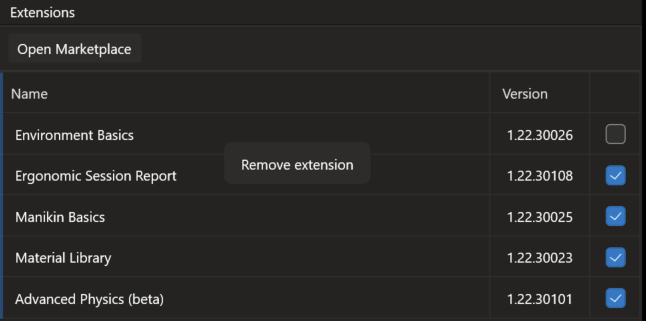
→ Disable the extensions loaded from the marketplace by unticking the box and right-clicking to select ‘Remove’. If this resolves the issue, contact Skyreal support so they can send you updated extensions
→ Check that you do not have two headset programmes running simultaneously, which could cause a conflict, for example Steam VR/Vive Hub and Oculus. Also check that OpenXR is enabled in the headset application you are using.