
How to Import a CAD File ?
Note: This feature has restricted rights and requires a CAD Forge License with the 3D import right. See the User Rights Management policy for more information.
Before you can visualize your CAD in VR, you need to import it into CAD Forge's 3D Data Library. The import process converts your CAD files into Unreal Engine 3D assets that can be used in Skyreal VR.
In the 3D Data Library, you can import CAD files from all major formats.
-
In CAD Forge, click the Import CAD button to open the import dialog.
-
Select your CAD file or drag and drop it into the designated area.
-
Configure your import settings and click Next.
-
Set your CAD visibility permissions.
-
Click Start Uploading.
Depending on the size of your CAD, this operation may take some time. The import automatically launches two background tasks: parts import and parts preparation.
Important: Do not close the application while the import is running.
3D Data Status
Your imported CAD files can have the following statuses:
Importing CAD
When you just start the import of a CAD, it doesn’t appear in your 3D Data Librery first, but a background task is launched to import your CAD in XR Center. XR Center is loading the product structure and 3D data. Once complete, a preparation task is automatically launched
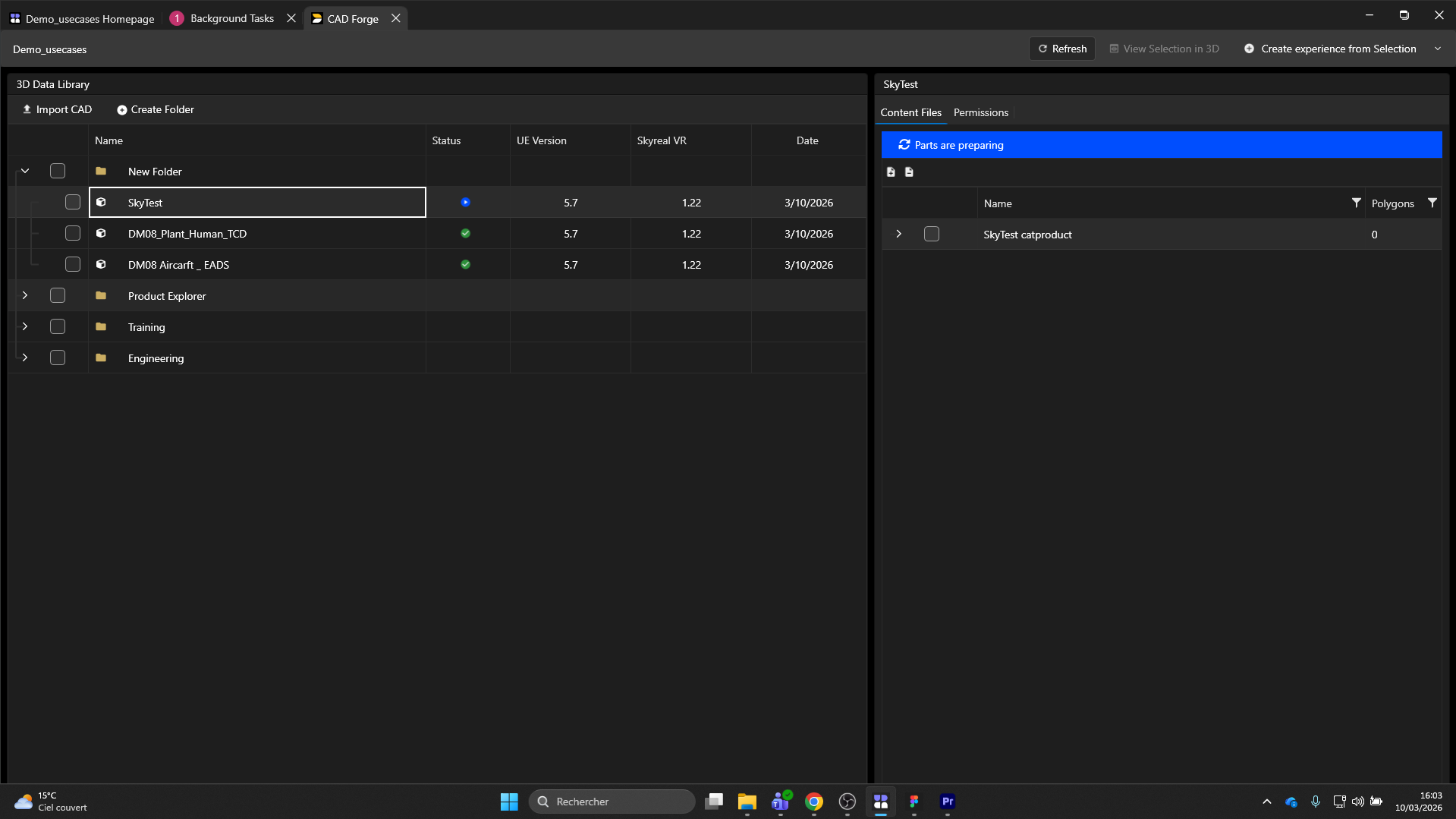
CAD Preparing
A blue banner indicates a preparation task is in progress. Do not close the application while the background task is running. Your CAD must be fully prepared before you can use it in the 3D Viewer or create an experience from it.
Supported Formats
|
Names |
Extentions |
|---|---|
|
CATIA V4 - V5 - DELMIA |
.CATPart .CATProduct .CGR .CATProcess .model |
|
CATIA V6 / 3DExperience |
.3dxml |
|
SIEMENS Product File |
.jt .plmxml |
|
Creo / Pro Engineer |
.prt .asm |
|
IFC |
.ifc |
|
RHINO |
.3dm |
|
SOLIDWORKS |
.sldprt .sldasm |
|
STEP |
.stp .step |
|
STL / Stereo-litography |
.stl |
|
Inventor |
.iam .ipt |
|
Parasolid |
.x_t .x_b .p_b .p_t |
|
AutoCAD |
.dwg |
|
Microstation |
.dgn |
|
Naviswork |
.nwd |
|
ACIS |
.dwg |
|
Others |
.igs .iges .vda |
|
FBX |
fbx |