
Extension of an Extension
An extension can expose an extension point: a list of entries that other extensions fill, without modifying it. For example, a "Presets" extension lets a customer extension add its own presets.
|
Extension |
Contains |
Role |
|---|---|---|
|
Base extension |
A Primary Data Asset (PDA) class, in |
Defines what an entry is, and uses the entries. |
|
Dependent extension |
Data assets of that class, in |
Provides the entries. |
Why a Primary Data Asset, and why the PDA folder
This is the key point of the system. Two reasons:
-
It is the only way to define your own data asset type in Blueprint. Unreal only lets you create data asset instances from a Blueprint class if it inherits from Primary Data Asset. That class is the "form" each entry fills.
-
The class must be loaded before the entries. Skyreal finds registrable assets with one scan per loading phase, and it can only recognize a data asset if its class is already loaded. This is why the class goes in
RegistrableAssets/PDA: Skyreal loads these folders first (Pre Init), then scans theRegistrableAssetsfolders (Init). If the class is anywhere else, the entries of other extensions can be ignored without any error.
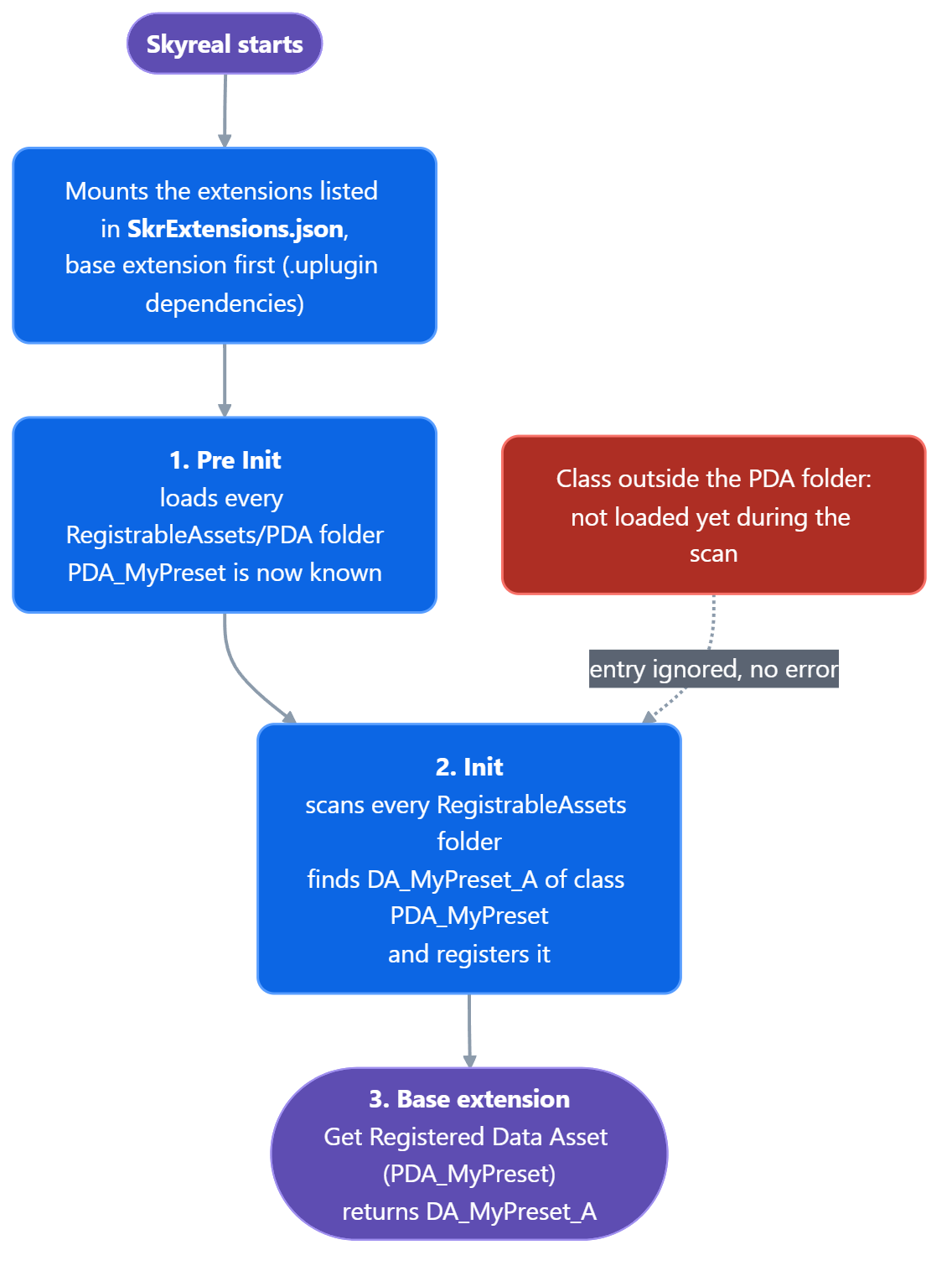
Skyreal uses the same mechanism, for example with PDA_CoordinateSystem (SkrBase) and PDA_LinkedAnimGraph (manikins).
Create the extension point (base extension)
-
In your extension, create the folder
Content/RegistrableAssets/PDA. -
Create a Blueprint whose parent class is Primary Data Asset, for example
PDA_MyPreset, and save it in this folder. -
In Class Settings, add the SkrAutoRegisteringAsset interface.
-
Implement Get Should Auto Register Asset and return true (or a Boolean variable, to let each entry choose). Without it, no entry is registered.
-
Add the variables each entry will fill, then compile and save.
Use the entries (base extension)
-
Get the Skr Registery Subsystem.
-
Call Get Registered Data Asset with your PDA class (
PDA_MyPreset). -
Use the returned entries to build your presets, tools, commands…
If extensions can be loaded or unloaded while Skyreal is running, also listen to the registry's Registered Data Assets Added and Removed events to stay up to date.
Add entries (dependent extension)
-
In the dependent extension's
.upluginfile, add the base extension as a dependency. -
In the Content Browser: Miscellaneous › Data Asset, then pick the base extension's class (
PDA_MyPreset). -
Fill its variables and save it in
Content/RegistrableAssets(not inPDA). -
List both extensions in
SkrExtensions.json.
Skyreal uses the .uplugin dependencies to load the base extension first. It does not add a missing extension to SkrExtensions.json for you.
Common issues
|
Symptom |
Check |
|---|---|
|
An entry is missing, with no error |
The PDA class is in |
|
The base class cannot be found |
The base extension is listed in |
|
An entry is not registered |
The data asset is under |
|
A referenced asset is missing |
An extension may only reference its own content or its dependencies' content. Engine assets and Unreal plugins that are not extensions are not guaranteed. |
Avoid circular dependencies: the base extension must never depend on the extensions that provide its entries.