
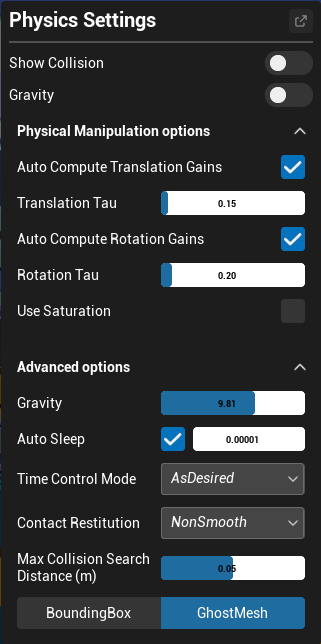
The Physics Settings panel allows users to customize how rigid bodies behave, interact, and respond to physical manipulation in XDE.
Physical Manipulation Options
Each manipulation method (Compass, Laser Grab, etc.) uses a physics manipulator that behaves like a spring-damper system.
Its behavior is controlled by two parameters: stiffness and damping, which determine how quickly and smoothly an object follows the manipulation.
These parameters can be configured in two ways:
-
Auto Compute Translation / Rotation Gains: Automatically calculates stiffness and damping based on the corresponding Tau value. A lower Tau value results in a faster and more responsive manipulation, while a higher value produces slower and smoother movements.
Auto Compute is convenient to manipulate any rigidbody of any mass with the same dynamism.
A higher Tau can be helpful to limit “high speed” movements that cause interpenetrations between rigidbodies. -
Manual Configuration: Allows users to define stiffness and damping values manually for more precise control.
As the stiffness is constant, the dynamism is proportional to the mass of the rigidbody. It makes the user feel the weight. -
Saturation: Limits the maximum forces and torques applied during manipulation. This prevents excessive physical responses, particularly when using low Tau values, and helps maintain a more controlled and realistic simulation.
Advanced Options
-
Gravity: Defines the gravitational acceleration applied to rigid bodies in the simulation.
-
Auto Sleep: Automatically puts rigid bodies to sleep when their velocity falls below a specified threshold. Higher values may cause objects to stop moving even when slight motion should still be visible.
-
Time Control Mode: Determines how simulation time is handled.
-
As Desired: Uses the default time step (0.01 s). If the simulation cannot maintain this rate, it slows down.
-
Sub Stepping: Divides simulation steps into smaller (distance) intervals to improve accuracy and reduce interpenetration, at the cost of performance.
-
-
Contact Restitution: Defines how collisions and contacts between rigid bodies are resolved.
-
NonSmooth: Enforces contact without allowing interpenetration. This provides more accurate contact behavior but can be more computationally demanding.
-
Penalty: Allows slight interpenetration and applies a restoring force to push objects apart. This method is generally better suited to lower-velocity interactions.
-
-
Max Collision Search Distance: Defines the maximum distance used to detect potential collisions. Higher values improve collision detection for fast-moving objects but increase computational cost.